
Lookalike Domains: Licensed, but Rarely Configured

The message that passes everything
The DKIM post described a message that passes SPF, DKIM and DMARC in full and is still a scam. The attacker had registered a domain that looked confusingly similar to a supplier's and set it up validly. Microsoft describes the same case in its own documentation on phishing protection: impersonation can pass all three checks if the attacker runs a lookalike domain with valid DNS records.
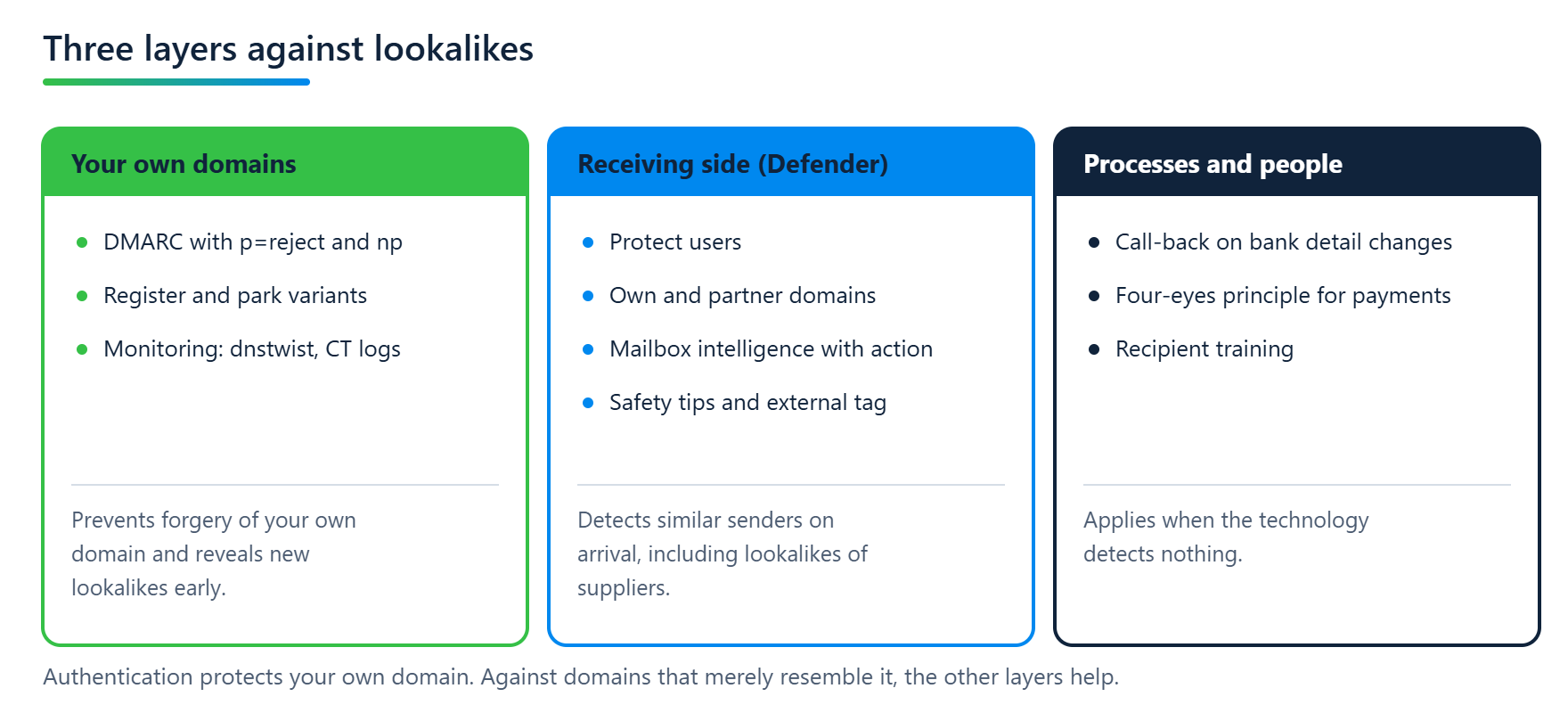
DMARC, as described in the DMARCbis series, protects a domain from being forged, and with np its non-existent subdomains as well. A domain that merely looks like yours belongs to someone else, who can publish their own valid records for it.
Lookalikes call for other measures, and some of them are already licensed in many Microsoft 365 tenants.
What lookalikes look like
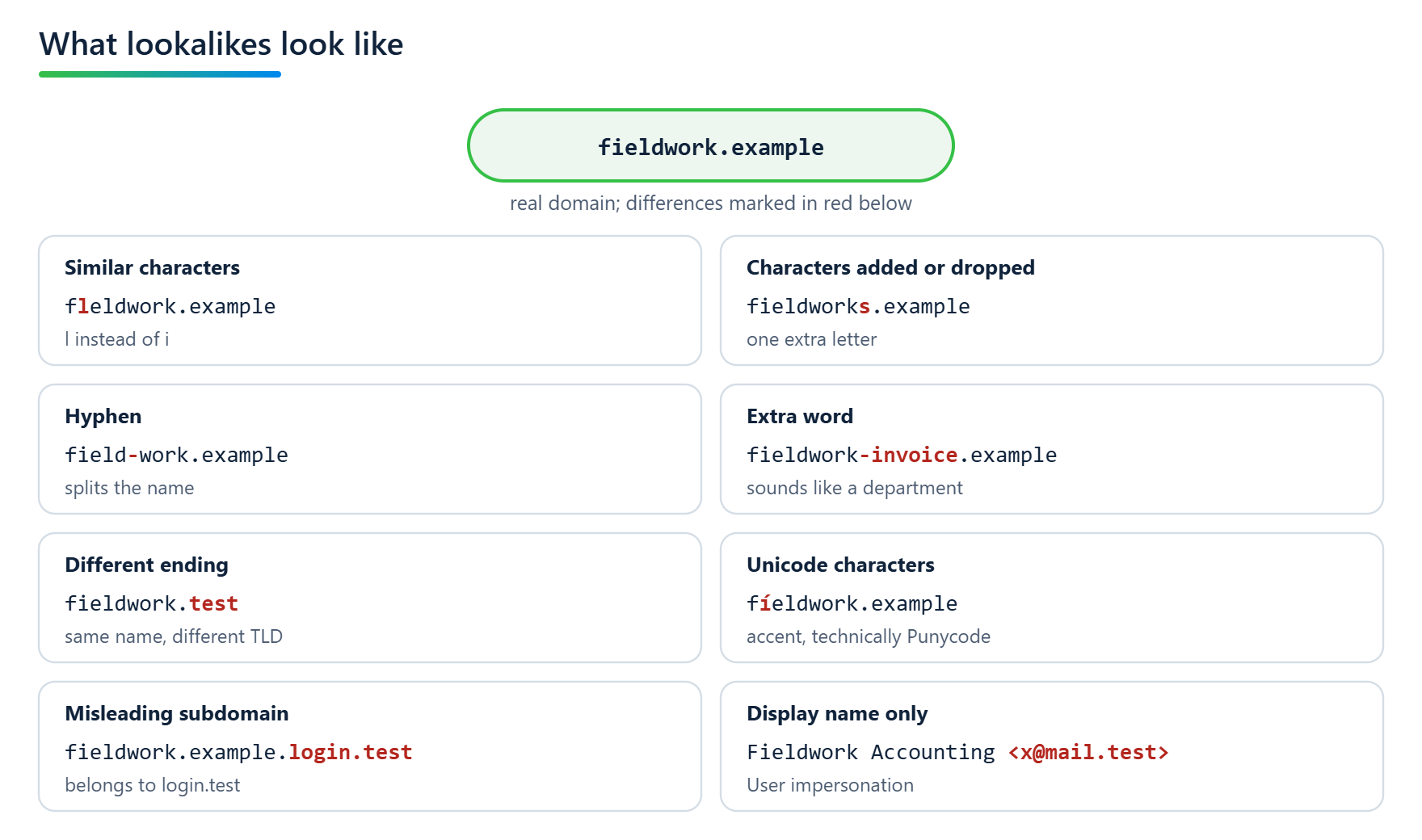
Using the real domain fieldwork.example as an example:
Similar characters:
fleldwork.examplewithlinstead ofi,fie1dwork.examplewith the digit1instead ofl. In many fonts the difference is barely visible.Characters added or dropped:
fieldworks.example,fieldwrk.example.Hyphen or extra word:
field-work.example,fieldwork-invoice.example.Different ending:
fieldwork.testinstead offieldwork.example.Unicode characters:
fíeldwork.examplewith an accent. Technically this runs through Punycode (RFC 3492) and IDNA (RFC 5890 ff.). According to the documentation of the dnstwist tool, most registries reject domains that mix characters from different scripts. Similar characters within the same script remain possible; Microsoft usesćóntoso.comas an example in its own documentation.Misleading subdomain:
fieldwork.example.login.testdoes not belong tofieldwork.example; it is a subdomain oflogin.test.No foreign domain at all: the display name reads "Fieldwork Accounting", the address behind it belongs to a freemail provider. Microsoft counts this as user impersonation, the combination of display name and address.
Microsoft 365: licensed, but rarely configured
Microsoft distinguishes between spoofing and impersonation. Spoofing is the forgery of the real address or domain. Authentication helps against it, and Microsoft includes spoof intelligence in every cloud mailbox for this purpose. Impersonation is the lookalike case: the sender or domain only resembles the original. Protection against it exists only in Defender for Office 365.
According to Microsoft's service description, Defender for Office 365 Plan 1 is included in Microsoft 365 Business Premium and, since July 1, 2026, also in Office 365 E3 and Microsoft 365 E3. Plan 2 comes with E5.
That does not mean the protection is configured. According to Microsoft Learn, the default policy turns on spoof protection and mailbox intelligence for all recipients; the other impersonation features are not configured there. In our projects, even Business Premium customers usually have little more than this baseline.
What is missing tends to be the same set of items:
Protected users: executives, accounts payable, and anyone whose name in a forged message can move money. User impersonation protection detects senders that imitate these people's display name and address.
Protected domains: your own and your partners'. Here, too, Microsoft sets "Don't apply any action" as the default action for a detection. If you add domains without choosing an action, impersonation gets detected, but nothing is done about it.
Mailbox intelligence: Microsoft learns who a mailbox regularly corresponds with and detects senders that resemble a known contact without being one. It is on in the default policy, but according to Microsoft the default action for a detection is "Don't apply any action".
Safety tips: first contact, user and domain impersonation, unusual characters. Apart from the first contact tip, they only appear when the corresponding protection is configured.
External sender tagging:
Set-ExternalInOutlook -Enabled $truemarks messages from outside the organization in all Outlook clients. This is an Exchange Online feature and independent of the Defender license.
The preset security policies Standard and Strict protect all your own domains from impersonation automatically and turn on mailbox intelligence. According to Microsoft, however, their settings are almost entirely fixed; only a few details can be added, such as recipients and the users and domains to protect. We therefore work with custom policies, whose thresholds and actions can be adapted to each environment. If you use both, keep in mind that preset security policies take precedence over custom ones.
From the field: impersonation protection with PowerShell
The same can be configured in an Exchange Online PowerShell session. Microsoft lists almost this exact configuration as an example in the cmdlet reference:
Set-AntiPhishPolicy -Identity "Office365 AntiPhish Default" `
  -EnableOrganizationDomainsProtection $true `
  -EnableTargetedDomainsProtection $true `
  -TargetedDomainsToProtect "supplier.example","taxadvisor.example" `
  -TargetedDomainProtectionAction Quarantine `
  -EnableTargetedUserProtection $true `
  -TargetedUsersToProtect "Anna Example;anna@fieldwork.example" `
  -TargetedUserProtectionAction Quarantine `
  -EnableMailboxIntelligenceProtection $true `
  -MailboxIntelligenceProtectionAction Quarantine `
  -EnableSimilarUsersSafetyTips $true `
  -EnableSimilarDomainsSafetyTips $true `
  -EnableUnusualCharactersSafetyTips $true
The command protects all your own domains, two partner domains and one person, sets quarantine as the action for every detection, and turns on the matching safety tips. It modifies the default policy; if you work with custom policies, adjust the name accordingly. The lists are replaced, not extended. For additional users, the reference documents the syntax @{Add="Name;address@fieldwork.example"}.
The supplier case
A lookalike does not have to imitate your domain. For an attacker, a supplier's domain can be more attractive: accounts payable expects invoices from there, and a message with changed bank details stands out less among genuine invoices.
Your DMARC does not help against this variant, and neither does the supplier's, because the lookalike domain belongs to neither of you. What does help is domain impersonation protection in Defender, which according to Microsoft can explicitly cover partner domains as well. Each anti-phishing policy can hold up to 50 additional domains.
Maintaining the list is manageable work: the bank, the tax advisor, the main suppliers, the IT service provider. It does need to be kept up to date when partners are added or dropped.
The flip side: when the original looks suspicious
Similarity detection can also hit the original.
A case from our practice, anonymized. A customer sends from a domain we will call fieldwork.example here. There is a second domain that looks the same apart from an l instead of an i, fleldwork.example, and it has a poor reputation. The customer's messages are repeatedly classified as suspicious by recipients on Microsoft 365. Which method Microsoft applies is not documented. The pattern suggests detection of visual similarity that, in this case, hits the original.
The sender cannot solve this alone. If impersonation protection is what triggers, a submission as "should not have been blocked" does not automatically override it, according to Microsoft Learn. For recurring legitimate senders, the recipient has to add the domain as trusted in their anti-phishing policy or allow it in the Tenant Allow/Block List. For the sender, this means informing their recipients and telling them what their admins can do.
There is one route on the sender's side, though: buying the similar domain, if it is available. That ends its abuse. Whether Microsoft rates it differently afterwards, and how quickly, is not documented, and Microsoft offers no reporting route for domains; the delist portal is meant for IP addresses. Public blocklists are more transparent. The Spamhaus Domain Blocklist, for example, lets listings expire once the domain no longer meets the criteria, according to Spamhaus, and early removal can be requested. Until the situation improves, the route via the recipients remains necessary.
Keeping an eye on your own domains
For lookalikes of your own domain, the first step is to spot them early.
You can register the most obvious variants yourself, especially other endings and obvious typos. A registered but unused domain should state publicly that it neither sends nor receives mail. The anti-abuse working group M3AAWG describes how in its Best Common Practices for parked domains (June 2022):
fleldwork.example.          TXT  "v=spf1 -all"
*.fleldwork.example.        TXT  "v=spf1 -all"
_dmarc.fleldwork.example.   TXT  "v=DMARC1; p=reject; rua=mailto:dmarc@fieldwork.example"
fleldwork.example.          MX   0 .
*.fleldwork.example.        MX   0 .
SPF authorizes nobody, DMARC asks for rejection, and the null MX under RFC 7505 states that the domain accepts no mail. DMARC reports go to the main domain. Because the reports are sent to a different domain, that domain has to consent to receiving them via DNS; M3AAWG describes this as well. The reports also show whether anyone is still trying to send under the parked domain.
Taking every variant is impossible. The open-source tool dnstwist usually generates thousands of variants for a single domain and, with --registered, shows only those that are actually registered. It also detects mail servers on such domains and can compare websites with the original. Running it regularly shows new lookalikes as soon as they appear in DNS.
A second source is Certificate Transparency logs (RFC 9162, classified as experimental like its predecessor RFC 6962). They make issued TLS certificates publicly traceable. Watching them shows when someone obtains a certificate for a similar domain. For phishing messages alone, however, an attacker needs no certificate, so this gap remains.
BIMI: yes in consumer inboxes, no in Outlook
BIMI displays the sender's logo next to an authenticated message. It requires DMARC enforcement, meaning p=quarantine or p=reject. According to the BIMI Group, Gmail and Apple additionally require a mark certificate (VMC or CMC), for which a verification authority confirms the rights to the logo. A lookalike therefore cannot take over your logo there. Yahoo, on the other hand, also displays logos without a certificate.
Microsoft does not appear in the BIMI Group's overview, and in Outlook the recipient sees a contact photo or initials. For mail to consumers, BIMI can therefore be one building block. In a Microsoft 365 environment, it plays practically no role.
Processes that complement technology
For cases the technology does not catch, you need rules that do not depend on the message:
Changes to bank details only after a call-back to a known number, never the one in the message.
Payments above a set amount under the four-eyes principle.
Training, so that recipients take signals such as external sender tagging seriously.
What you can check
Three checks can be done without a project:
Which variants of your domain are registered?
dnstwist --registeredwith your domain gives you a first list.What is configured in the tenant? In the Defender portal, the anti-phishing policies show whether impersonation protection is active and which users and domains it covers.
Is your own domain protected against exact forgery? That is the DMARC side, and our tool mailaudit checks it from the outside.
Sources
Microsoft Learn, Preset security policies in EOP and Microsoft Defender for Office 365
Microsoft, Microsoft Defender for Office 365 service description
Microsoft Learn, Use the delist portal to remove yourself from the blocked senders list
M3AAWG, Protecting Parked Domains Best Common Practices (June 2022)
Related posts

SPF: Who Gets to Speak in Your Name?
SPF answers a single question: is this server allowed to hand over mail on behalf of this domain? Why the ten-lookup limit exists, where the lookups go in real-world records, why SPF breaks on forwarding, and why an SPF pass without alignment counts for nothing under DMARC.
DMARCbis is here. What is changing. And what is not.
The new DMARCbis standard is here: Learn what is changing with email authentication, why your existing record will continue to work, and which DNS details are now important.

DKIM: Who Signed This Message?
DKIM signs the message itself, and the signature survives every hop that changes nothing. Whoever signed it is not necessarily the sender. Why Microsoft 365 needs two rotations to reach 2048 bits, and why a properly signed message can still be phishing.