
SPF: Who Gets to Speak in Your Name?

Part 1 of the Email Security Fundamentals series.
One question, one answer
SPF has an undeserved bad reputation. It is seen as fragile, as broken by forwarding, as the thing that runs out of room after three cloud services. All of that is true. And yet the problem rarely lies with SPF itself. It lies in the jobs people expect it to do, jobs it was never built for.
SPF answers a single question: is this server allowed to hand over mail on behalf of this domain? That is the question RFC 7208 defines, and it is a remarkably narrow remit. SPF says nothing about whether a message was altered in transit. It says nothing about the sender your Outlook displays. It says nothing about whether the mail can be trusted. It authorizes an IP address for a domain name, and that's it.
How a record is read
An SPF record is a TXT record in DNS. It sits directly on the domain and starts with v=spf1:
example.com. IN TXT "v=spf1 ip4:192.0.2.1 include:_spf.mailprovider.example -all"
In plain language: mail from 192.0.2.1 is fine. Mail that comes through the mail provider is fine. Nothing else is.
The record is looked up for the domain the sending server gives as the sender in the SMTP session. That is not necessarily the domain you see in your mail client. The receiver queries only that one name. There is no fallback to the parent domain, unlike with DMARC. Every domain and subdomain that shows up as a sender therefore needs its own record.
The receiver works through the entries, which the RFC calls terms, from left to right. As soon as one matches the connecting IP, the result is settled and evaluation stops. That is why all goes at the end: it matches every address and decides what happens to everything else.
Each mechanism carries a qualifier that determines which result a match produces. Without one, + applies.
+yieldspass: the client is authorized.-yieldsfail: the client is explicitly not authorized.~yieldssoftfail: probably not authorized, but the domain owner won't commit.?yieldsneutral: no statement is made, deliberately.
On top of that come three results that don't stem from a qualifier: none if no record was found at all, temperror for a temporary DNS problem, and permerror if the record could not be interpreted correctly.
The two weak results are often confused in practice. Section 8.2 says neutral must be treated exactly like none; the difference exists for information only. And softfail is explicitly not a reason to reject: Section 8.5 says receivers should not reject a message on the basis of a softfail alone. Publishing ~all doesn't get you halfway to enforcement. It gets you a statement of intent without consequences.
Section 2.1 draws the corresponding conclusion: if you want receivers to be able to make negative decisions, you have to publish a record that ends in -all or redirects to one that does. Otherwise no reliable statement about missing authorization is possible.
The ten-lookup limit
A common defect is a record that breaks the DNS lookup limit. It usually hits organizations that have collected Microsoft 365, a CRM, a newsletter tool, a ticketing system and two marketing services over the years, each one via include.
The rule is in Section 4.6.4. The terms include, a, mx, ptr, exists and the modifier redirect trigger DNS queries. Implementations must limit the total number of these terms to ten during one evaluation. If the limit is exceeded, the result is permerror. Not softfail, not neutral, but an error that, according to Section 2.6.7, requires intervention by the DNS operator.
The limit is global. Section 4.1 makes clear that it is kept as a single counter across all recursive evaluations. An include that triggers four further lookups internally uses up five of ten, not one.
mx adds a sub-limit: evaluating a single MX record must not trigger more than ten address lookups. ptr is on the list, but Section 5.5 says it should no longer be published. Verifiers only still have to support it because it is occasionally in use.
The limit isn't arbitrary. Section 11.1 describes what it protects against: an attacker who publishes an SPF record with many references to someone else's domain and then sends mail in bulk turns every checking receiver into an amplifier for an attack on the victim. A few bytes in the SMTP session generate many times that in DNS traffic, and the origin of the attack stays hidden. That is why the limit has to be low.
A related limit covers empty lookups. Terms whose DNS query returns either an empty answer or NXDOMAIN are called void lookups. Section 4.6.4 recommends limiting them to two, with permerror as the result if that is exceeded. This is a SHOULD, not a MUST, and implementations may make the value configurable. In practice you run into it with records that still point to services switched off long ago.
The mechanisms differ in cost. ip4 and ip6 compare directly against a network and use no lookup. a and mx resolve DNS. include starts a complete evaluation of the other record and takes over only its result, not its terms. The name was an unfortunate choice, and the specification admits as much in Section 5.2: a -all in the included record does not end the outer evaluation. Sections 10.1.1 and 10.1.2 derive a ranking from this: ip4 and ip6 before a before mx. The administrative cost is the mirror image. With mx, the record never has to change when the mail servers do; with ip4, you are back in the record every time you renumber.
Where the lookups go
Hardly any record breaks the limit because of a single service. Usually three patterns add up.
Split includes. Some providers spread their networks across several sub-records, for example by IPv4 and IPv6 or by region. One include in your own record then turns into two or three lookups. Your own record gives no hint of this.
Transitive includes. An included service in turn includes the services it sends through itself. It then costs you more than lookups: you also authorize senders you never chose. Who gets to speak in your name is, in that case, partly up to your provider.
Redundancy. The same service sits directly in the record and is also pulled in through another include. Section 4.6.4 counts every evaluated term; there is no exception for duplicates. The second entry costs a lookup and authorizes nothing new.
From the field: mx alongside Microsoft 365
In Microsoft 365 environments you often come across this record:
v=spf1 mx include:spf.protection.outlook.com -all
If all of the domain's MX records point to Exchange Online, mx is redundant. The addresses of the MX targets fall within the networks that spf.protection.outlook.com already publishes. mx then authorizes nothing extra, but costs at least one of the ten lookups. Microsoft Learn gives the record for domains that send only through Microsoft 365 without mx. If you are at nine out of ten, removing it buys you headroom at no cost.
You can check this in a minute: resolve the MX targets and compare their addresses with the include's networks. The condition applies to all MX records, not just the one with the highest priority. If there is a backup MX or an upstream gateway, mx authorizes its addresses too. Whether removing it breaks anything then depends on whether that system sends outbound mail.
Check your lookups regularly
Split, transitive and redundant includes have one thing in common: they can change without you touching your record. The lookup count is therefore not a fixed value. It needs checking regularly, not only when you change your own record.
Three mistakes the specification explains
Multiple SPF records on one domain. Common during migrations: the old record stays, the new one is added. Section 3.2 forbids this, and Section 4.5 describes the consequence. If more than one record remains after discarding everything that doesn't start with v=spf1, evaluation returns permerror. The domain then doesn't have two policies. It has none.
+all as a fig leaf. A record ending in +all authorizes every server in the world for your domain. That isn't SPF, it's an open invitation. It usually happens when a delivery problem was fixed under time pressure.
The implicit ending. A record without all and without redirect ends with the result neutral, per Section 4.7, as if ?all stood at the end. For the specification that is a valid state; for the operator it is rarely the intended one. The RFC therefore recommends an explicit ending, not least to make troubleshooting easier.
The fourth point isn't a mistake. For names that send no mail, Section 10.1.2 calls a record that authorizes nothing well-established best practice. Tellingly, the RFC's example is a web server:
www.example.com. IN TXT "v=spf1 -all"
Because SPF doesn't inherit, this applies to every existing name individually. Non-existent names are covered by DMARC through np. If you manage a domain portfolio, this is usually where most of the gaps are.
The identity nobody sees
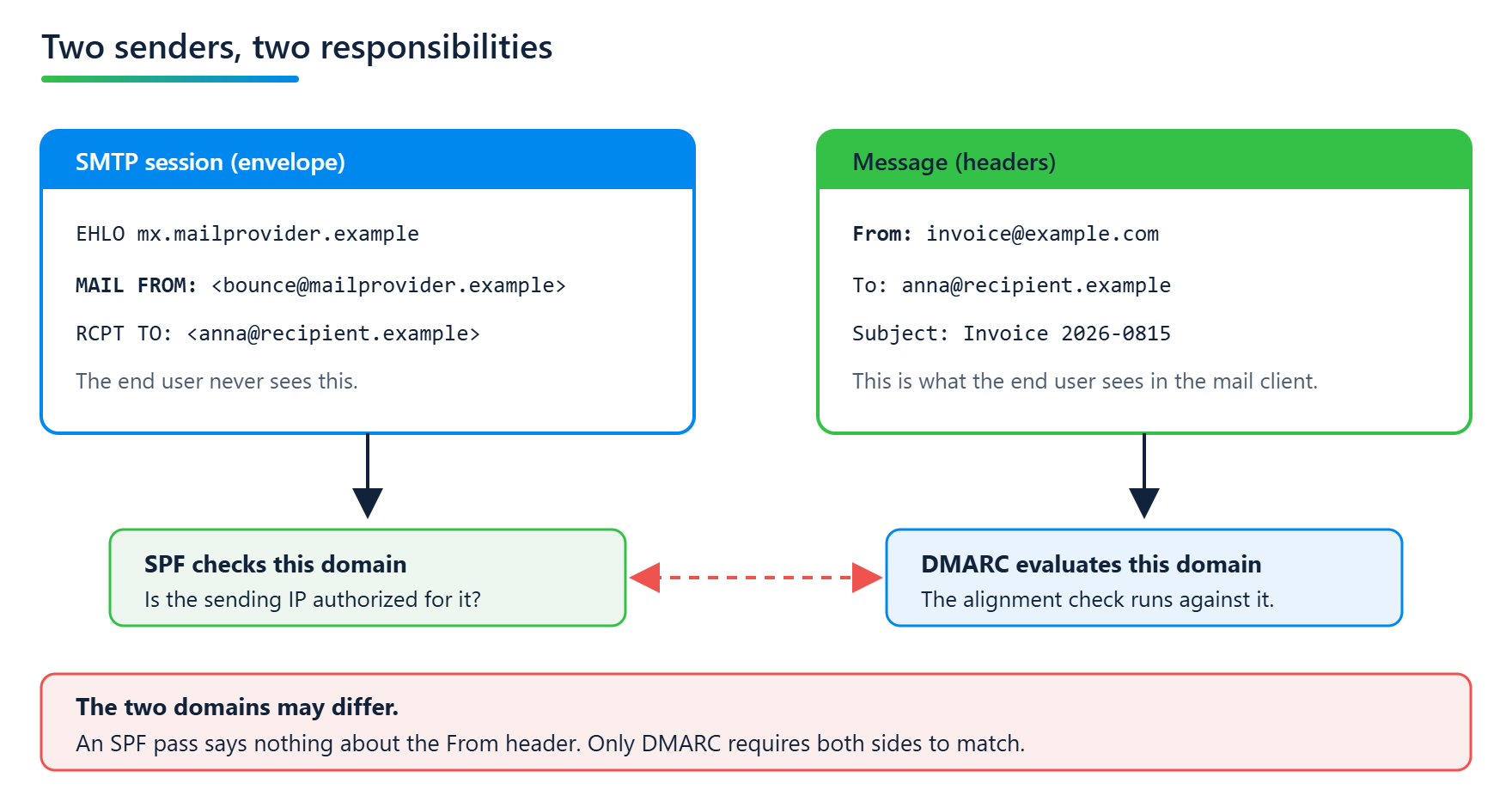
An SMTP handover carries two sender fields, and they have nothing to do with each other.
The first sits in the SMTP session itself, in the MAIL FROM command. It is called the envelope sender or Return-Path and serves transport: that is where bounce messages go. An end user normally never sees it.
The second sits in the message's From: header. That is the sender the mail client displays, the one people react to and the one an attacker wants to forge.
SPF checks the first. Section 2.4 makes checking the MAIL FROM identity mandatory. The From: header address does not appear in the specification as something to check. The RFC is aware of this and says so plainly in Section 11.2: an SPF-authorized message can carry any other identities in its headers, and a user who doesn't notice the difference is lulled into a false sense of security.
This isn't a weakness of implementations, it is the design. SPF authorizes the transport path. What is inside the message lies outside its remit.
Why SPF breaks on forwarding
When a mailing list redistributes a message or an address forwards mail automatically, the mail leaves its original sending path. The RFC calls such intermediaries mediators and describes in Section 10.3 what happens: SPF always evaluates the IP of the last sending server. That is then the forwarder, no longer the sender's server.
If the forwarder keeps the original envelope sender, the receiver checks the sender domain's SPF record against the forwarder's IP. It doesn't match there, and the check fails. The mail is perfectly legitimate, and the result is fail all the same.
If the forwarder changes the envelope sender to its own domain, SPF works again, but it now vouches for the forwarder rather than the sender. For transport, that is cleanly solved. For the question of whether the original sender was genuine, the result has become worthless.
This second approach has a name: Sender Rewriting Scheme, or SRS. The forwarder sets an address in its own domain as the envelope sender and encodes the original one in it, so that bounce messages find their way back to the sender. RFC 7208 describes this approach in Appendix D.2 as a possible mitigation, without prescribing a particular scheme. SRS is not an IETF standard. Exchange Online applies it automatically when mail is forwarded to external recipients (Microsoft Learn), with one exception: messages that go through the so-called relay pool, mainly those that already failed SPF on the way in, are not rewritten.
SRS changes nothing for DMARC. The rewritten address belongs to the forwarder's domain, and DMARC requires the checked domain to match the From: header. If the original sender has no DKIM, the forwarded message is left with nothing it could pass DMARC with.
This is where DKIM comes in: a cryptographic signature travels with the message rather than with the transport path. It survives an intermediate hop as long as nobody touches the signed parts. That is the subject of part 2.
An SPF pass is not a DMARC pass
DMARC evaluates the domain in the From: header. SPF checks the domain in the envelope. For an SPF result to count for DMARC at all, the two have to match. That check is called Identifier Alignment, and it has two modes. In the default relaxed mode, it is enough for both domains to share the same Organizational Domain. In strict mode they have to be identical.
The case that matters most in practice looks like this: you send through a provider that sets bounce@mailprovider.example as the envelope sender, while your own domain is in the From:. The provider's SPF record matches, and the check passes. For DMARC the result is still worthless, because mailprovider.example and your domain are not the same organization. The pass shows up in the header but contributes nothing.
That is why trying to fix DMARC problems through SPF is misleading.
As far as DMARC is concerned, an SPF pass without alignment is no SPF at all.
How the Organizational Domain is determined under DMARCbis, and why that has changed compared with the old Public Suffix List, is covered in part 3 of the DMARCbis series.
What you can check without asking anyone
The state of an SPF record is public. You don't need access to a tenant to see whether a domain has multiple records, how many DNS lookups the evaluation costs or whether the record has a defined ending. It is all in DNS.
Our tool mailaudit resolves a domain's include chain completely and shows the running count for every term, including nested entries. That makes split, transitive and duplicate includes visible. What cannot be read from DNS stays out of scope. Whether a forwarding chain in your organization regularly breaks SPF is something only your DMARC reports can tell you.
Email Security Fundamentals series
SPF: Who Gets to Speak in Your Name?
Sources
RFC 7208, Sender Policy Framework (SPF) for Authorizing Use of Domains in Email, Version 1
RFC 9989, Domain-based Message Authentication, Reporting, and Conformance (DMARCbis)
Microsoft Learn, Set up SPF to identify valid email sources for your Microsoft 365 domain
Microsoft Learn, Sender Rewriting Scheme (SRS) in Microsoft 365
Related posts

DMARCbis is here. What is changing. And what is not.
The new DMARCbis standard is here: Learn what is changing with email authentication, why your existing record will continue to work, and which DNS details are now important.

Full Participation: Why a DMARC Standard Doesn't Mean p=reject for Everyone
DMARC is now an IETF standard, RFC 9989. But a standard is not a mandate, and full participation does not mean p=reject. What DMARCbis actually requires, and why the standard even bars receivers from blindly enforcing p=reject.

DMARCbis: The tag changes and why t doesn't replace pct
DMARCbis cleans up the DMARC tags: pct, rf, and ri are dropped, while np and t are added. It sounds like routine, but it isn't everywhere. Why t does not replace pct and what this means for the path to full enforcement.