
DKIM: Who Signed This Message?

Part 2 of the Email Security Fundamentals series. See part 1 on SPF.
What SPF leaves open
The SPF post ended with an unsolved problem. Figuratively speaking, SPF checks the sender on the envelope, not the one in the letterhead. When a message is forwarded, the forwarder puts it into a new envelope. With SRS, it writes its own address on that envelope, which fixes transport. Who originally wrote the letter can no longer be proven through SPF.
That calls for proof inside the letter itself: a signature. That is DKIM's job. The sender signs the message, and the signature travels with it, however many servers the mail passes through.
In time, DKIM is not a successor. SPF appeared in April 2006 as an experimental RFC, DKIM in May 2007; they are two approaches to the same problem. Since 2011, DKIM has been an Internet Standard, the highest maturity level at the IETF. SPF still sits one level below, as a Proposed Standard. DMARC only joined the standards track in May 2026 with RFC 9989, also as a Proposed Standard; its predecessor was merely informational.
DKIM therefore answers two questions at once. First: has a particular domain taken responsibility for this message? Second: are the signed parts unchanged since signing?
RFC 6376 draws a narrow line in Section 1.5, though: a valid signature states that the hashed content has not changed since signing, and nothing else. Whether that content is harmless or a scam, DKIM doesn't say.
The distinction sounds academic, but it decides how useful your security concept is. Picture a message from invoices@example.net, while your real supplier uses example.com. The attacker registered the lookalike domain themselves and sets everything up validly: SPF record, DKIM key, DMARC record at p=reject. They sign their message cleanly with d=example.net, the domain in the From: header matches, and alignment holds.
This message passes SPF, DKIM and DMARC in full, and it is still a scam.
Email authentication answers the question of whether a domain really is that domain. It doesn't answer whether you should trust that domain. Anyone who rolls out DMARC expecting phishing to stop arriving has the wrong expectation. What DMARC reliably prevents is the forgery of your own domain. Against a similar-looking third-party domain it does nothing; that takes other measures: domain monitoring, sender checks at the gateway, trained recipients.
How a signature is created
When sending, the signer computes two hashes: one over the message body, one over a selected list of headers. The header hash is signed with the private key, and the result goes into a new header called DKIM-Signature:
DKIM-Signature: v=1; a=rsa-sha256; d=example.com; s=sel2026;
  c=relaxed/relaxed; h=from:to:subject:date;
  bh=MTIzNDU2Nzg5MDEyMzQ1Njc4OTAxMjM0NTY3ODkw...;
  b=dzdVyOfAKCdLXdJOc9G2q8LoXSlEniSbav+yuU4zG...
The key tags: d= is the signing domain that takes responsibility. s= is the selector, which allows several keys to be run in parallel. h= lists the signed headers, bh= holds the body hash, and b= contains the actual signature. It is computed over the headers listed in h= and over the DKIM-Signature header itself, with b= left empty for that purpose (Section 3.7). The body hash is therefore signed too. a= and c= come further down.
The checking server, which the RFC calls the verifier, builds the address of the public key from s= and d=. With d=example.com and s=sel2026, it queries sel2026._domainkey.example.com. At the end of that lookup sits a TXT record containing the public key. Often, though, the name first leads on via CNAME; with Microsoft 365, for instance, to a record that Microsoft maintains. No certificate, no certificate authority. Section 1.4 calls this a deliberate design decision: the verifier fetches the key directly from the claimed signing domain, not from a third party.
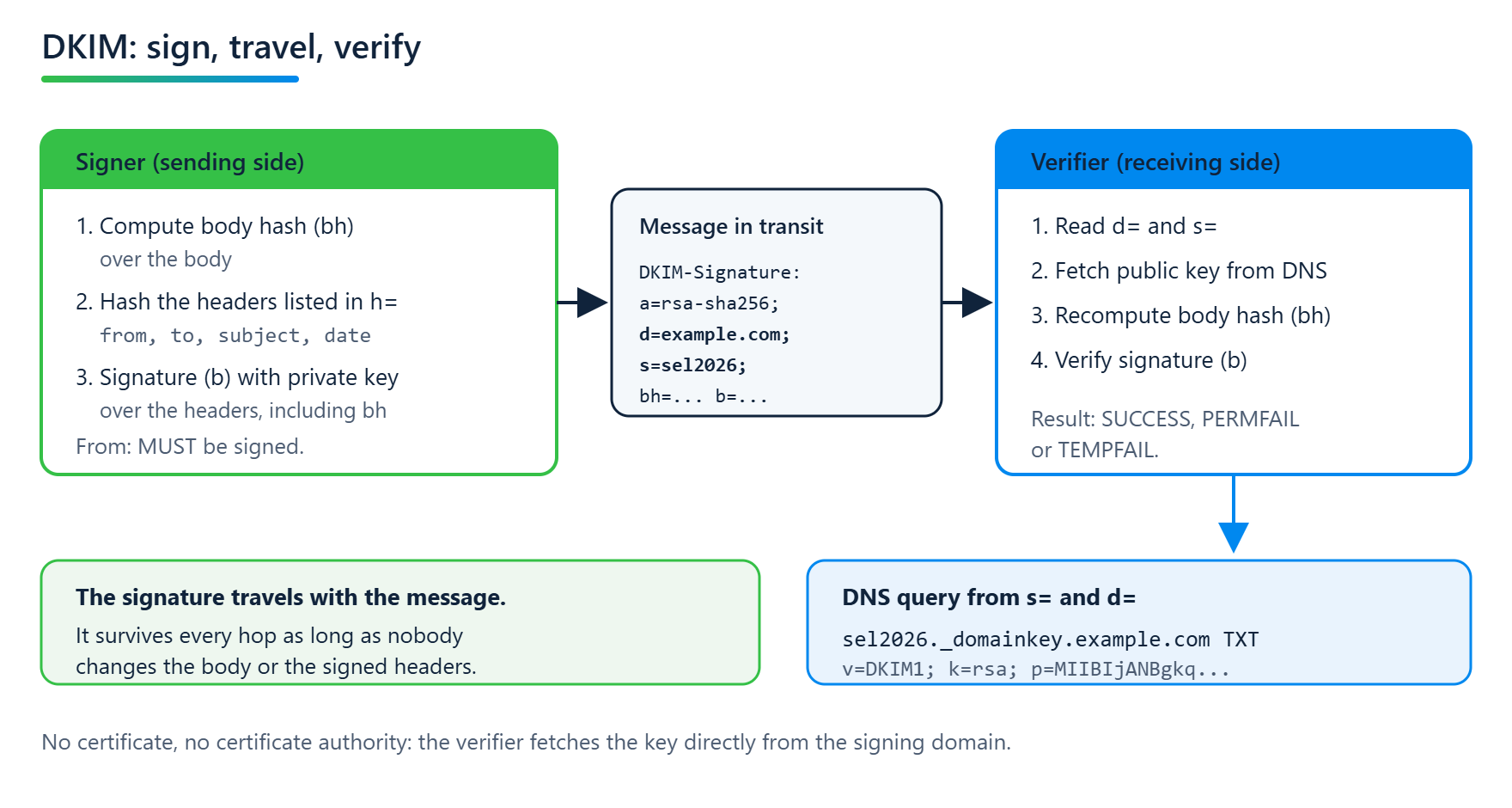
The From: header must always be signed. Section 5.4 makes this a MUST, and Section 6.1.1 adds the check on the other side: if from is missing from the h= list, the verifier must discard the signature. Anything else would be pointless, since the sender could then be swapped without breaking the signature.
What a signer signs beyond that is a judgment call. Section 5.4.1 recommends including the headers that carry meaning, such as Subject, Date, To and Cc, and leaving out the ones that are expected to change in transit or get added more than once, notably Received and Return-Path.
According to Section 5.4, a signer may also list headers in h= that don't exist at signing time. They then count as an empty string, and if someone adds them later, the signature breaks. This is how the absence of a header can be protected.
Why 2048 bits and not more
Key size is where cryptographic recommendations and DNS reality get in each other's way.
RFC 6376 originally required at least 1024 bits for long-lived keys and asked verifiers to be able to check keys from 512 to 2048 bits. RFC 8301 raised the bar in 2018 and settled three things:
Signers must use RSA keys of at least 1024 bits and should use at least 2048 bits.
Verifiers must not treat signatures made with keys under 1024 bits as valid.
Verifiers must be able to check keys from 1024 to 4096 bits.
The same RFC also removed rsa-sha1 as a signing and verification algorithm. Originally both algorithms were defined, and verifiers had to support rsa-sha1. Since RFC 8301, only rsa-sha256 is allowed. If you still run a signer that sets a=rsa-sha1, it produces signatures that a compliant verifier must reject.
If 2048 bits is good, why not 4096?
The reason lies not in cryptography but in DNS. RFC 6376 Section 3.3.3 names as its first factor in choosing a key size the practical constraint that large keys, explicitly using 4096 bits as the example, may not fit into a 512-byte DNS UDP response. On top of that comes a format limit one level down: a single character string in a TXT record holds at most 255 bytes. RFC 8301 describes this problem in its introduction as the reason long keys never caught on in practice; widely used DNS management software handled only a single string per TXT record, and an RSA key well above 1024 bits does not fit into one.
A 2048-bit key exceeds the 255-byte limit as well and has to be split into several strings, which the verifier joins back together without separators. RFC 6376 Section 3.6.2.2 requires this. Modern DNS providers do the splitting automatically, older interfaces don't. When a newly deployed DKIM key doesn't work, in our experience this is often the cause, and rarely the cryptography.
In practice, then, 2048 bits is the sensible size. 4096 bits is covered by the standard, but for a key that is rotated regularly anyway it adds little benefit and produces response sizes that are more likely to cause trouble. RFC 6376 Section 3.3.3 cites short key lifetimes as a separate argument against very large keys.
How often to rotate is not set by RFC 6376. The anti-abuse working group M3AAWG has recommended since 2019 rotating at least every six months. It becomes too often when an old key disappears before every message signed with it has arrived; per RFC 5321, mail servers keep retrying delivery for at least four to five days. If you rotate somewhere between monthly and every six months, you are on the safe side.
Rotation does not help against a replay attack, though. In a replay, a message that was validly signed once is resent in bulk, and the signature stays valid as long as the key is published. RFC 6376 describes the attack in Section 8.6 and offers only partial solutions. This is another point DKIM2 addresses; more on that below.
One more note from Section 3.1 on long-lived keys: reusing a selector for a new key is explicitly unwise, because you can then no longer tell whether a signature fails because of a key change or because of a forgery. New key, new selector.
From the field: 2048 bits in Microsoft 365
Microsoft 365 works with two selectors, selector1 and selector2, only one of which signs at any time. Rotate-DkimSigningConfig creates a new key on the inactive selector, in the new size with -KeySize 2048. According to Microsoft Learn, it only becomes active after 96 hours. Until then the old key keeps signing, and another rotation is blocked.
Moving from 1024 to 2048 bits therefore takes two rotations at least four days apart. The second one is not cosmetic: the inactive selector stays published in DNS as well. A 1024-bit key that nobody signs with anymore thus remains a valid verification key for your domain.
Microsoft 365 doesn't rotate on its own
For your own domains, you trigger rotation yourself, in the Defender portal or with
Rotate-DkimSigningConfig. According to Microsoft Learn, there is currently no automatic rotation even for the*.onmicrosoft.comdomain.
Canonicalization: how sensitive should the signature be?
Mail servers often change details in transit without anyone meaning to: whitespace, line breaks, header folding. Without countermeasures, every one of these changes would break the signature.
That is why Section 3.4 defines two canonicalization algorithms, separately for headers and body. simple tolerates practically nothing. relaxed collapses runs of whitespace, removes whitespace at line ends, lowercases header names and unfolds headers. It is specified as a pair in the c= tag, for example c=relaxed/relaxed. Without it, simple/simple applies to both.
The RFC gives a clear rule of thumb in Section 5.4.1: if you mostly send machine-generated mail such as order confirmations that rarely passes through modifying intermediaries, simple is fine. If you send mail from people to people, relaxed is considerably more robust.
Two more tags belong in the same context, both to be handled with care. The l= tag limits the signature to the first n bytes of the body, so that appended footers don't break it. Section 5.4.1 warns against this: anyone can fill the unprotected remainder, and l=0 allows the text to be changed completely while the signature stays valid. Our recommendation: don't use l=. Section 8.2 explicitly warns signers against it and leaves assessors free to ignore such signatures entirely. A signature that covers only part of the body says nothing about the rest, and therefore nothing about the message as a whole. The i= tag names an address or domain below d=. Section 3.5 states explicitly that it doesn't have to match any header and that its meaning to end recipients is unclear.
Whoever signed is not automatically the sender
Up to this point, the only question was whether a signature is valid. For DMARC, that isn't enough.
RFC 6376 states explicitly in Section 3.11 that DKIM requires no match whatsoever between the signing domain and any header of the message. A signature with d=any-domain.example on a message with From: ceo@example.com is cryptographically fine. Whether anything should follow from that, the RFC explicitly leaves to the assessor.
This is not an oversight; it is a deliberate gap. DKIM was meant from the start to let service providers, relays and mailing lists sign too; Section 1 explicitly names delegation to third parties as a design goal. Binding the signature to the sender was left to a layer above. The first attempt, ADSP (RFC 5617, 2009), is now classified as historic. The gap was only closed by DMARC, in 2015.
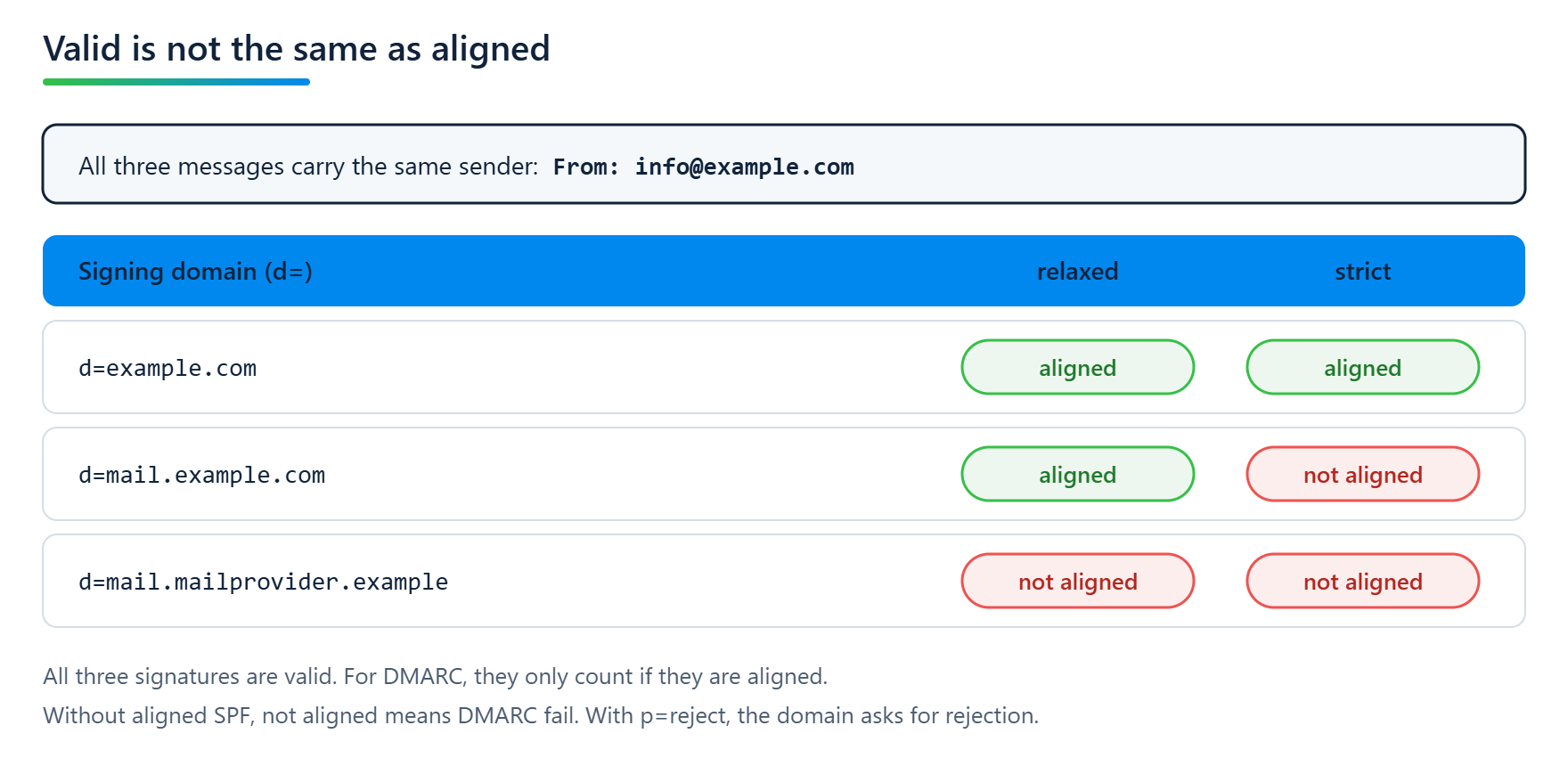
DMARC requires the signing domain to match the domain in the From: header. To return to the image from the beginning: the signature has to match the letterhead. The check is called Identifier Alignment and has two modes. In the default relaxed mode, it is enough for both to share the same Organizational Domain; in strict mode they have to be identical.
An example of the difference. Your message carries From: info@example.com and is signed with d=mail.example.com.
relaxed: Both domains belong to the Organizational Domain
example.com. Aligned, the signature counts.strict:
mail.example.comandexample.comare not identical. Not aligned, the signature doesn't count for DMARC, even though it is valid.
What follows depends on the rest of the message. If there is no other aligned result, SPF included, the message fails DMARC. If the domain is at p=reject, it asks the receiving system to reject the message.
The case that matters more in practice is a different one. A newsletter provider signs with its own domain by default, for example d=mail.mailprovider.example, while your domain is in the From:. The signature is valid, but alignment fails in both modes because the Organizational Domains differ. For DMARC, the message is as good as unsigned.
The usual way out is to have the provider sign with a selector under your own domain. The provider generates the key pair and keeps the private part; you publish the public part under your domain, usually via a CNAME pointing to a record at the provider. That makes d= your domain, and alignment holds. This setup is not described as such in RFC 6376; it has become established in operations and is widely offered by email service providers.
Two examples, as of October 2026, according to the providers' own instructions: Mailchimp has you create two CNAMEs for DKIM, with k2._domainkey as the example, plus a DMARC record. There is no SPF configuration there, so DMARC passes through DKIM alone. SendGrid sets up two selectors, s1._domainkey and s2._domainkey, only one of which signs at any time, much like Microsoft 365 with selector1 and selector2. Unlike Microsoft, SendGrid rotates the keys itself. If a selector is already taken, for example because the same domain is authenticated in a second account, you can define your own. That is what selectors exist for in the first place: Section 3.1 introduces them so that a domain can run several keys at the same time.
Through such fixed selectors, our tool mailaudit recognizes which services are set up for a domain.
That makes DKIM the more robust of the two mechanisms for DMARC. SPF loses its meaning on every forward, because the envelope sender changes. DKIM survives transport. How the Organizational Domain is determined under DMARCbis, and why that no longer has to give the same result as the old Public Suffix List, is covered in part 3 of the DMARCbis series.
The mailing list problem
Ironically, the very intermediaries DKIM was built to survive better than SPF are what bring it down.
A mailing list that adds a [List] prefix to the subject changes a signed header. A list that appends an unsubscribe line changes the body. RFC 6377, the Best Current Practice on DKIM and mailing lists, lists both as standard behavior and notes that changes to the body alter the body hash computed by the verifier and thereby render existing signatures useless.
The list can re-sign the message afterwards, and many do. Then there is a valid signature with d=list.example.org. That helps delivery, but not DMARC: the signing domain is now the list's, the domain in the From: header is still the original author's, and without alignment the new signature doesn't count for DMARC.
This is the indirect flow problem, and it is still unsolved. SPF breaks on forwarding, because the envelope sender changes. DKIM breaks as soon as someone works on the content. It is one of the reasons DMARCbis dropped the aspiration of universal p=reject. We covered this in detail in part 4 of the DMARCbis series.
For operations, this leads to an uncomfortable but useful expectation: if your users post to mailing lists, those messages will fail at some receiving systems under p=reject. That isn't a configuration error you can configure away.
What comes next
Under the name DKIM2, the IETF is working on a further development meant to address the breaks described here: forwarding, changes in transit, and replay. The document, draft-ietf-dkim-dkim2-spec, is, as of October 21, 2026, an Internet-Draft at revision 07, not an RFC. A dedicated post will follow once the draft has settled.
What you can check without asking anyone
With DKIM, checking from the outside is less complete than with SPF, and there is no way around that. DNS offers no way to enumerate all selectors of a domain. You can only look up whether a key is published under a known selector.
mailaudit checks a list of common selectors for this and shows under which ones a key is published. If it finds none, that doesn't mean there is no DKIM. Whether your systems actually sign every outgoing message isn't in DNS. Only your DMARC reports show that.
Email Security Fundamentals series
DKIM: Who Signed This Message?
Sources
RFC 8301, Cryptographic Algorithm and Key Usage Update to DomainKeys Identified Mail (DKIM)
RFC 6377, DomainKeys Identified Mail (DKIM) and Mailing Lists
draft-ietf-dkim-dkim2-spec, DomainKeys Identified Mail Signatures v2 (DKIM2)
RFC 9989, Domain-based Message Authentication, Reporting, and Conformance (DMARCbis)
Microsoft Learn, Set up DKIM to sign mail from your Microsoft 365 domain
Related posts

SPF: Who Gets to Speak in Your Name?
SPF answers a single question: is this server allowed to hand over mail on behalf of this domain? Why the ten-lookup limit exists, where the lookups go in real-world records, why SPF breaks on forwarding, and why an SPF pass without alignment counts for nothing under DMARC.

NIS2 and DMARC: Why No Law Tells You What to Do
NIS2 never mentions DMARC. For many companies there is still no way around it. The path from the law to the actual technology runs through the state of the art and Germany's BSI technical guidelines. With legal context from Raphael Köllner.

DMARCbis: The DNS Tree Walk and Why np Doesn't Always Fire on DNSSEC Domains
DMARCbis replaces the Public Suffix List with a DNS Tree Walk. What the psd tag actually does, and why np can silently fail on DNSSEC domains that use Compact Denial of Existence.